Turning Boring Discord Roles into Gold with /collect-income and Server Economy
Most Discord roles are just worthless trophies. You grind for weeks just to turn your name a new color, and then... nothing. Let’s turn those useless colors into a living economy that actually gives your members a reason to stay.
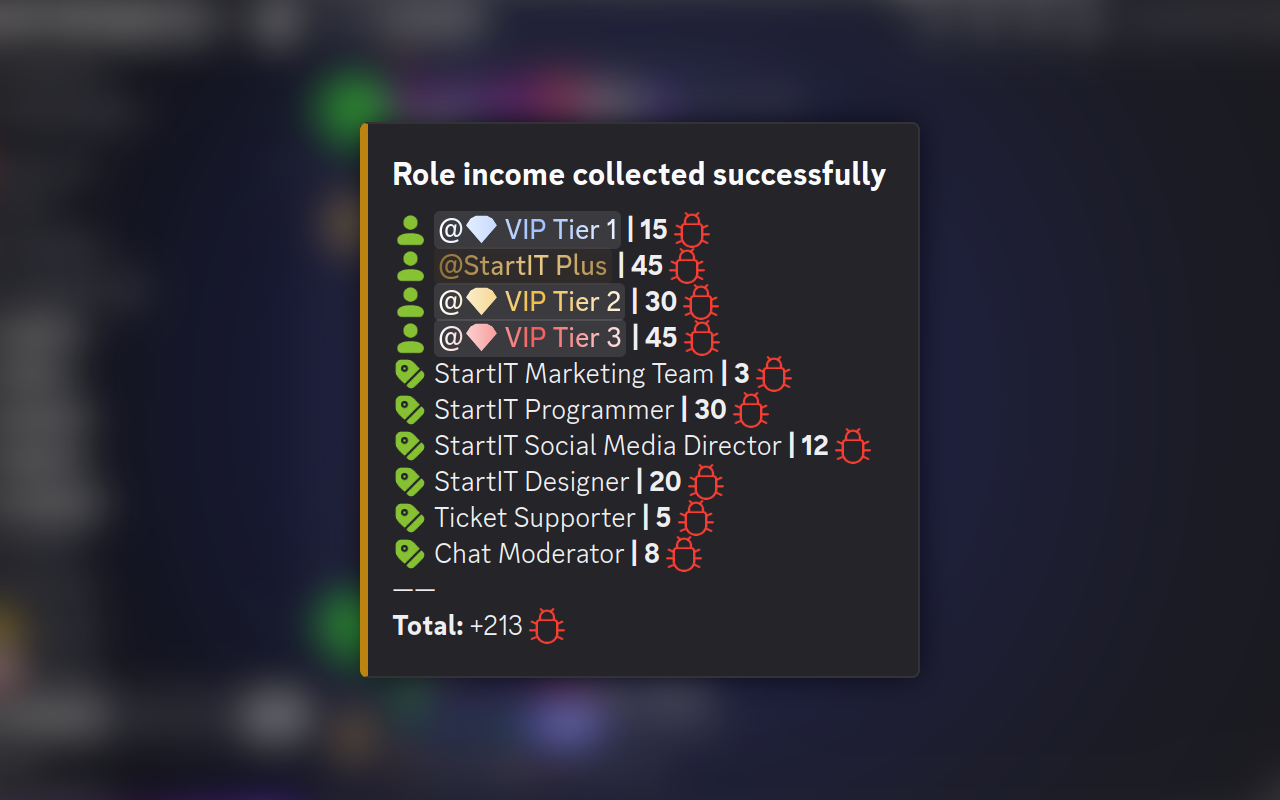
ATTENTION
This guide assumes you already have the StartIT bot on your server.
If you’re getting started, check out our initial setup guide first.
Let’s be honest for a second. Most Discord roles are just digital participation trophies. You grind for weeks, finally hit Level 10, and your reward? Your name turns a slightly more aggressive shade of turquoise. It’s boring. It’s static. And frankly, it’s a missed opportunity to turn your community into a living, breathing ecosystem.
Imagine instead that a role isn't just a color—it’s a career. It’s a key to a vault. It’s a reason for your members to check back every single day. By setting up a robust /collect-income system, you aren't just giving away "fake money." You are building a world.
Open the Dashboard: Head to www.startit.bot and click on /collect-income command in the Economy plugin.
The "Daily Bread" Strategy
Every journey starts with a single coin. The most basic setup solves the "Why am I here?" problem. If your members have nothing to do between conversations, they’ll drift away.
In your dashboard, look for the Salary amount and Payout schedules. Let’s say you have an "Nitro Booster" role. You want them to feel like they’re earning their keep just by being part of the crew.
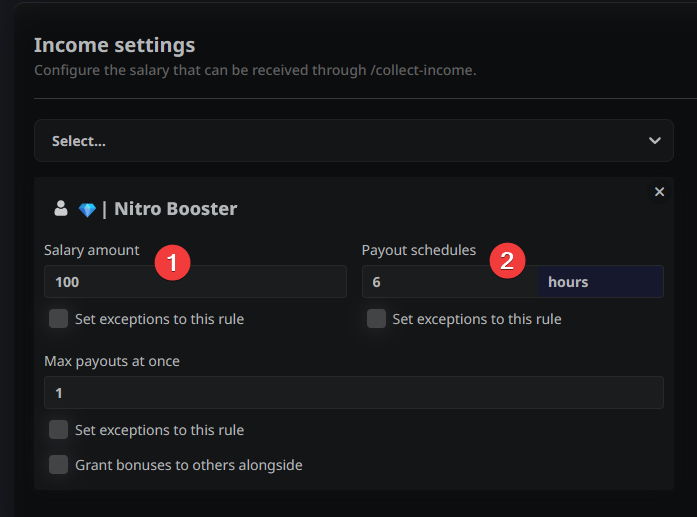
The Setup: Set the Salary amount to 100 and the Payout schedule to 6 hours.
The Result: Now, every 6 hours, that user can run the /collect-income command. They aren't just "Member #452" anymore; they are a paid contributor to your digital city.
Solving the "I Have a Life" Problem
We’ve all been there. You set a 6-hour timer, but then you go to sleep, or (heaven forbid) go outside. You miss three or four payout windows. It feels like the bot is punishing you for being a human. This is where most economies fail because they feel like a second job.
Think of this as a "Reward Reservoir." Instead of the money disappearing if it isn't claimed, it stacks up in a queue.
Let's set the Max payouts at once to 4.
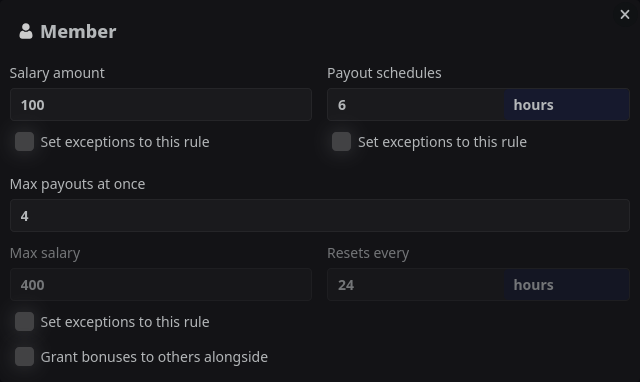
If your "Member" is busy for 24 hours, they don't lose those four intermediate payouts. When they finally type the command, the bot sees they’ve been gone, calculates the backlog, and drops a massive 400-coin payday on them at once.
It turns "I missed my window" into "I’m coming back to a windfall." It rewards loyalty without demanding a 24/7 presence.
Note: When someone uses the command for first time, they will get maximum salary possible, so in this example $400 and after 6 hours they can get another $100.
The Exceptions
You know how in video games you can get a standard sword, but if you're wearing the "Dragon Slayer" gauntlets, that same sword suddenly glows blue and does triple damage? That is exactly what the Set exceptions to this rule button does for your server economy.
This is the part where you get to be a genius designer. For an exception to work, the user needs to hold two keys. They must have the Base Role (the one the configuration is for) AND the Special Role you define in the exception. It’s a specialized bonus for those who go the extra mile.
Imagine you’re running a high school server. Your have students, they study sometimes, sometimes they type /collect-income and they get their $200. It’s a good life. But then, there's Ultra-Steve.
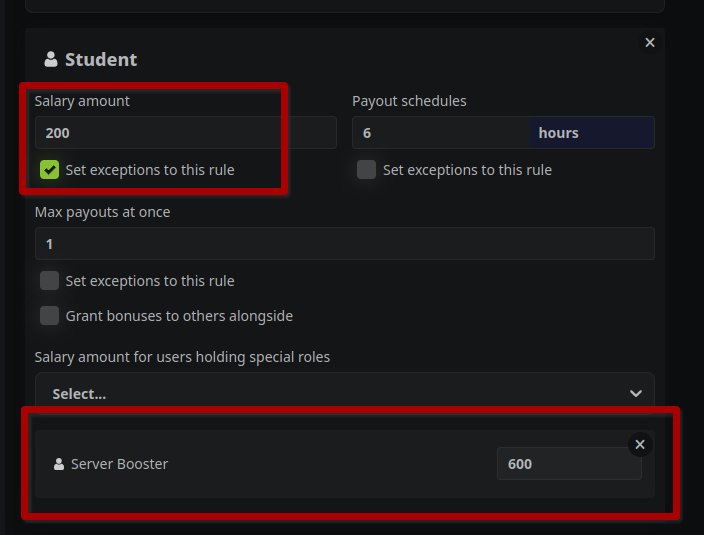
Steve isn't just a student. He’s also a Server Booster. He’s got that neon glow. He’s got the shiny badge. A regular Booster doesn’t get this money. A regular student gets $200. But the moment a student hits that boost button? Boom. Their paycheck instantly triples to $600 because they hold both roles. 🐉
Layering the Perks
Once you realize you can stack these "Exceptions," you can start getting really creative with how your VIPs experience the server.
⚡ The "Overclocked" Schedule
Who says everyone has to wait the same amount of time? Use an exception on the Payout schedules. While the "Junior Staff" are waiting 6 hours for their coins, you can give your "Elite" role holders an exception that lets them collect every 2 hours. They aren't doing a different job; they’re just "overclocked" and more efficient.
🎒 The "Bottomless Bag" Strategy
We talked about the stacking limit (Max payouts at once) earlier. Why not give your most dedicated players a bigger wallet?
- The Setup: Everyone has a limit of 1 payout.
- The Exception: You give the "Vault Hunter" role an exception of 10 payouts.
- Now, your most active players can go on a weekend camping trip, come back, and claim a massive pile of loot all at once, while the newbies have to be more "hands-on."
Why This Makes Your Server "Pop"
By using exceptions, you are creating a Status Economy. People will start looking at those bonus roles—like "Veteran," "Supporter," or "Event Winner"—not just as a pretty color, but as a literal multiplier for their digital life.
The "CEO & Employee" Synergy
This is the most advanced move in the book. Usually, economy bots are a solo experience. You type a command, you get money, you leave. But what if one person’s success benefited everyone else?
Let's say you have a "Shop Owner" role and an "Employee" role.
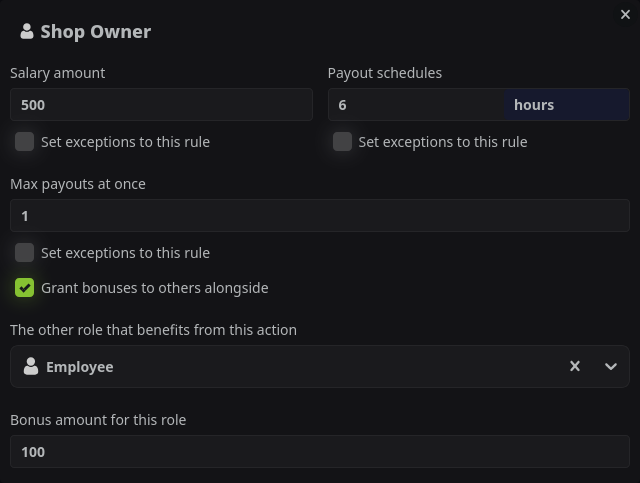
Under the Shop Owner's income settings, toggle Grant bonuses to others alongside. Select the "Employee" role in the dropdown and set a Bonus amount of 100.
Every time the Shop Owner collects their big paycheck, the bot automatically deposits 100 coins into the pocket of every single person holding the Employee role.
Pro-Tips for Your Digital Empire
The Night Owl Role:
Create a role that only has a 1-hour payout schedule, but set the exception so it only applies to people with the "Night Owl" role. It’s a great way to keep your server active during those quiet 3 AM hours.
The Tax Collector:
Use the "Grant bonuses" feature in reverse. When the "Police" role collects their salary, have it trigger a small bonus for the "Public Fund" (a specific role you give to your most trusted moderators or a community pot).
The Master Craftsman:
Set a very low "Max payouts at once" (like 1) for base roles, but increase it to 10 for "Master" roles. This represents their "storage capacity" or "efficiency" in the world you've built.
How to Build it Right Now
- Open the Dashboard: Head to www.startit.bot and click on /collect-income command in the Economy plugin.
- Pick Your Base: Select the role that represents your average user.
- Layer the Logic: Don't just set a number. Think about the frequency. Is 3 hours too fast? Is 24 hours too slow?
- Add the Exceptions: Use that "Set exceptions" button like a surgical tool. Reward your Boosters, your Staff, and your Veterans.
- Test the Flow: Join your server as a test user. Run the command. Does it feel rewarding? If not, bump those numbers up!
Your server isn't just a chat room. With these settings, it’s a marketplace, a kingdom, and a game all rolled into one. Stop letting your roles be just colors—start letting them be a fortune.